Key Takeaways
- AI dispatch is augmentation, not a robot takeover: It absorbs the overflow and the busywork the overwhelmed office cannot reach, then hands the judgment calls back to a human. The Skynet framing is marketing noise in both directions.
- The match is only as good as your shop’s data: Skill profiles, job history, and equipment records in the field-service software decide who gets sent where. Bad records send a two-week tech to a 200-ton chiller.
- Guardrails are the feature that matters: Escalation rules and human sign-off are what keep an automated dispatcher from creating callbacks, at roughly 300 to 600 dollars each. If a tool cannot show you its guardrails, that is the red flag.
- You can shape how it treats you: These systems are trainable in plain language. Keeping your skills, certs, and job outcomes current in the system is how you get routed to the right work instead of the wrong roof.
AI dispatch is being sold as a fix, and the pitch swings between “it will replace your whole office” and “the machines are taking over.” Both are hype. What these tools actually do is narrower, more useful, and worth understanding from the tech’s seat, because the data behind them decides what lands on your schedule.
What AI Dispatch Actually Does (and What It Does Not)
Strip the marketing back and the real goal was never replacing people, it was helping an office that is drowning. One office manager running CSR duty, dispatch, and the membership base cannot keep up, and the software absorbs the repetitive load. An “AI employee” in this context is a narrow, tool-using agent: a program that takes input, follows a goal, and performs one defined workflow in your software, such as booking a job after it negotiates a time.¹ That is genuinely useful, and it is a long way from a tech on a roof.
What it handles well: 24/7 intake, overflow when two calls land at once, after-hours booking, follow-up, and routing suggestions. In one vendor survey, contractors using AI reported reclaiming over four hours per week from admin tasks like data entry and follow-ups (a platform-operator survey, so weigh it accordingly).² What it does not do is replace field judgment, turn a wrench, or run your shop on its own. Software is a tool that should yield to the human the moment you take control, the same principle good building-automation systems already follow. Tech sits downstream of process and culture, a point we made in building culture before buying software.
How the Match Gets Made: Skills, GPS, and Job Type
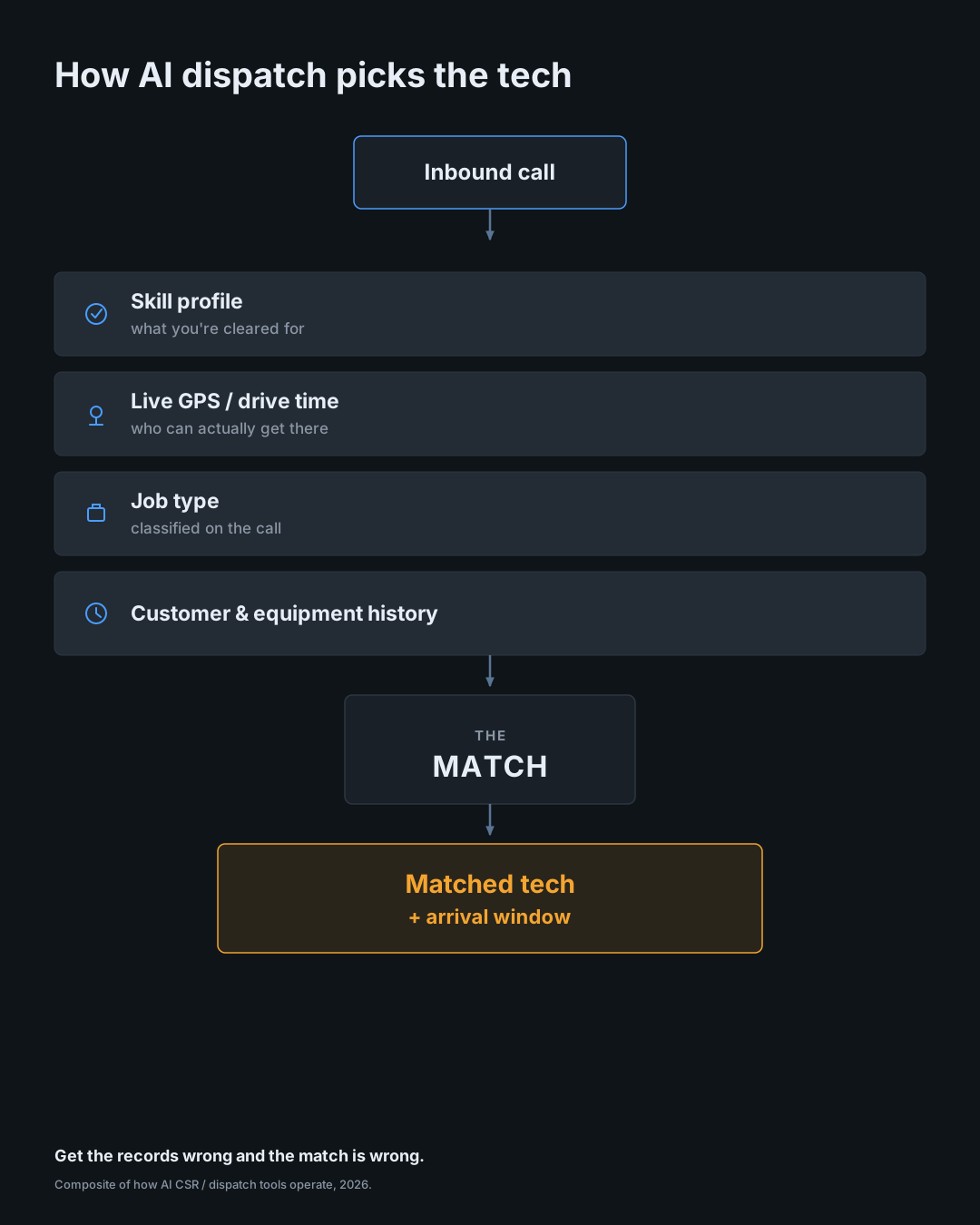
From the truck you never see the decision, so here is what feeds it. Four inputs do most of the work: your skill profile in the field-service management database (what jobs you are cleared for, residential or commercial, refrigeration, controls, install or service), live GPS and drive time, an on-the-fly classification of the call as the AI listens, and customer plus equipment history (system age, who did the last job, whether there is a regular tech who knows the site).
The business reason these tools exist is speed. A long-cited lead-response study found that contacting a fresh lead within five minutes made contact about 100 times more likely and qualification about 21 times more likely than waiting 30 minutes, and that only 23 percent of companies even managed a five-minute response.³ That research came from B2B web leads, not HVAC calls, so treat the multipliers as direction rather than gospel. The payoff for you is concrete anyway: fewer cross-town drives, fewer jobs over your head, and customers who already have a real arrival window before you pull up. Routing is also where office and field friction lives, which we covered in the empathy gap.
Garbage In, Wrong Truck Out: Why Your Shop’s Data Decides Everything

The AI is matching against your records, so if the records are wrong, the match is wrong. Skill profiles that never got updated still think the new hire only swaps filters, or still tag a seasoned tech as a rookie. The result is the two-week tech rolling up to a chiller, a second truck, and a customer who no longer trusts you.
What has to stay current: skills and certifications, job outcomes, the equipment logged at each site, and accurate drive-time territories. The nameplate photo a tech snaps to log a unit is exactly the kind of data that feeds a better match later. The tool cannot know what nobody entered, which is the same reason most shops are still evaluating rather than running these systems. In one 2026 trades survey, only 12 percent had embedded AI into operations while 34 percent were experimenting and 41 percent were watching (a vendor survey, noted).⁴ Skill-level matching is a people problem before it is a software problem, which is the thread running through managing real people in the trades.
The Guardrails That Keep It From Making a Mess
The feature that separates a real tool from a liability is the guardrail set. Good systems run on explicit rules: pick the shortest realistic drive time, never book past a set window without escalating to a human, flag any job classified above a tech’s clearance. Just as important, they take plain-language correction. Tell the system it booked the wrong tech on a job, and it folds that into its rules and lets you re-test the scenario before it goes live again.
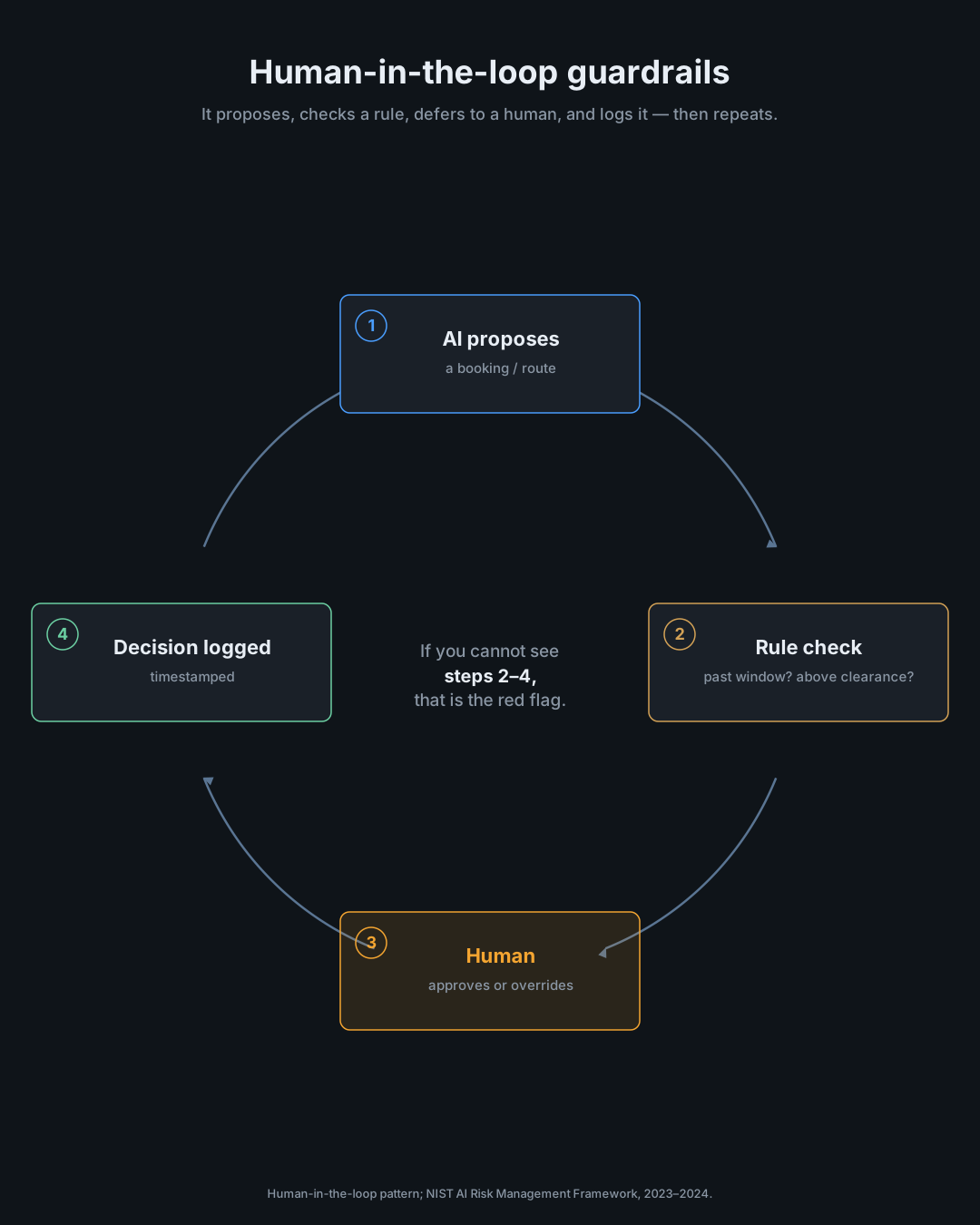
Human-in-the-loop is the point. Correlational data from a vendor service report found that high-performing field-service teams were about 2.6 times more likely to use intelligent scheduling tools, which says the tooling helps teams that already run tight, not that it fixes a loose operation by itself.⁵ Automation without sound logic just generates noise, the same failure mode we documented in why threshold-based alerts fail in commercial HVAC. When you evaluate a tool, make the vendor show the escalation rules, the override, and the decision log live. If they gloss over it, walk.
Evaluating an AI Dispatch Tool (and Making It Work for You)
Run any dispatch tool through a short checklist before it touches your schedule. Does it integrate with your field-service software, price book, and accounting, or does it create double entry? Can the vendor show a real before-and-after on speed-to-lead or drive time instead of a staged demo? Can you correct it in plain language and confirm the fix sticks? Are the decision log and override visible to your staff? The miss is expensive: industry models put the cost of a callback in the 300 to 600 dollar range once you count the truck, the labor, and the overhead.⁶ The NIST AI Risk Management Framework and its small-business quick-start guide give you the questions to ask about data ownership, auditability, and what happens to your records if you cancel.⁷
Set expectations honestly, too. Across all industries, only about half of AI pilots reach production, and only a small share of organizations report meaningful financial impact, so a tool that shines for a large enterprise may need real cleanup before it earns its keep in a five-truck shop.⁸ And vet the company the way you would vet any sub. AI has made scams more convincing, with the FBI logging more than 22,000 AI-related crime complaints in 2025 and home-repair fraud landing on consumer watchdog top-ten lists, so the daily DM promising you 30 booked jobs deserves a hard look before a dollar moves.⁹
For the tech specifically: keep your own record sharp, push feedback through your office when a route is wrong, and treat a bad assignment as a data problem to fix rather than just a gripe. The shops that understand the inputs get routed better and waste less time. The ones who treat it as a black box inherit its mistakes. Staying ahead of the tools, the heart of the Kaizen mindset, is what keeps you in the driver’s seat. Ask your office what your skill profile says about you, and whether the dispatch tool has a visible override and log.
Answer honestly about the tool being pitched
Will it show its source for an answer (manual, bulletin, doc and revision)?Non-negotiable
Is it grounded in data fit for your work (manufacturer specs, your records), not just the open web?
Does it flag when it is unsure, instead of always answering with confidence?
Is there a clear line for what it does alone vs what needs your sign-off, with an override?Non-negotiable
Can you check its output faster than just doing the task yourself?
Does it tie into your field-service and accounting software without double entry?
Do you own your data, can you audit it, and export it if you cancel?Non-negotiable
Can the vendor show a real before and after or reference customers, not just a demo?
How it scores: three answers are non-negotiable. If a non-negotiable is a No, the tool fails no matter how it scores elsewhere. Source, human override, and data ownership are the ones you do not bend on.
Verdict
Recommendation
—
answer the 8 questions
Red flags
—
non-negotiables missing
Answer the questions above
Every box starts at No on purpose. Most tools fail at least one non-negotiable, so make the vendor earn each Yes.
Additional Sources
- “What Are AI Agents?”, Amazon Web Services, Technical Documentation, 2025.
- “2025 AI Industry Report: The AI-Assisted Skilled Trades Pro”, Housecall Pro, Industry Survey, 2025.
- “Lead Response Management Study”, Dr. James Oldroyd / InsideSales.com with MIT, Research Study, 2007.
- “2026 State of AI in the Trades”, ServiceTitan, Industry Survey, 2026.
- “2024 State of Service Report”, Salesforce, Industry Survey, 2024.
- “HVAC Callback Rate Benchmarks”, Built on Tenth, Industry Analysis, 2026.
- “AI Risk Management Framework (AI RMF 1.0) and Small Enterprise Quick Start Guide (SP 1314)”, National Institute of Standards and Technology (NIST), Government Framework, 2023 to 2024.
- “State of AI 2025”, McKinsey & Company, Global Survey, 2025; and AI pilot-to-production figures, Gartner, Industry Research, 2024.
- “2025 Internet Crime Report”, FBI Internet Crime Complaint Center (IC3), Government Report, 2026; and “Top Ten Scams of 2025”, National Consumers League, Consumer Report, 2026.
Whether you require installation, repair, or maintenance, our technicians will assist you with top-quality service at any time of the day or night. Take comfort in knowing your indoor air quality is the best it can be with MOE heating & cooling services Ontario's solution for heating, air conditioning, and ventilation that’s cooler than the rest.
Contact us to schedule a visit. Our qualified team of technicians, are always ready to help you and guide you for heating and cooling issues. Weather you want to replace an old furnace or install a brand new air conditioner, we are here to help you. Our main office is at Kitchener but we can service most of Ontario's cities
Source link